
Togo RV – RV GPS and more
Roadpass DigitalTravel & Local
2.8237.00 Reviews
- Version
- 1.4.55
- Installs
- 100.00K
- Age Rating
- Everyone
Screenshots
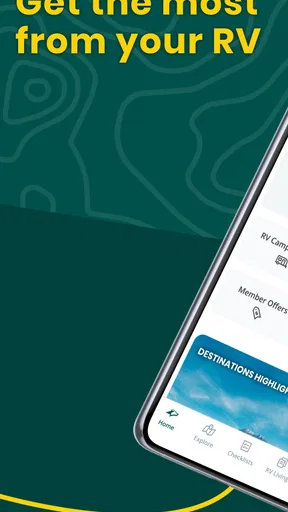
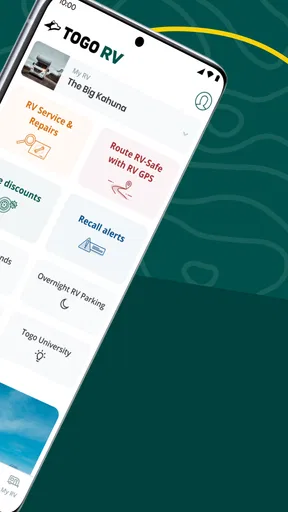
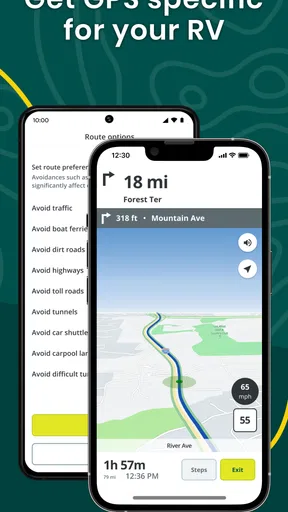
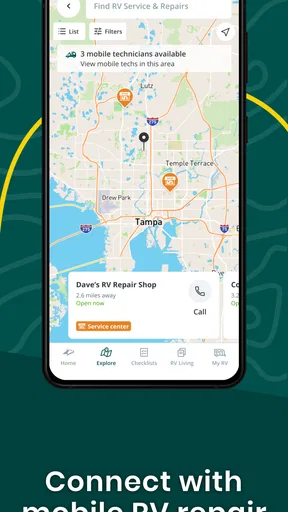
Our Review of Togo RV – RV GPS and more
 Analysis by Appyee
When I look at an RV app, I do not judge it only by the number of destinations it can show. I want to know whether I can understand it quickly, operate it without unnecessary effort, and still make sensible decisions when the road, weather, vehicle, or passengers make travel more demanding. Togo RV – RV GPS and more takes that broader approach. It combines trip guidance with RV-focused how-to material and checklists, so it feels aimed at the whole ownership experience rather than navigation alone.
I reviewed it as a free Travel & Local app from Roadpass Digital, and my impression is mixed but useful. The idea is practical, especially for people who want one place for route planning and reminders. At the same time, the average rating sits at 2.8 from around 464 ratings, which is a clear signal to approach it with realistic expectations rather than treating it as a flawless replacement for every travel tool. Its audience is RV owners and renters, but the accessibility question is just as important: can different people use it comfortably in different situations?
How the layout supports readability and navigation
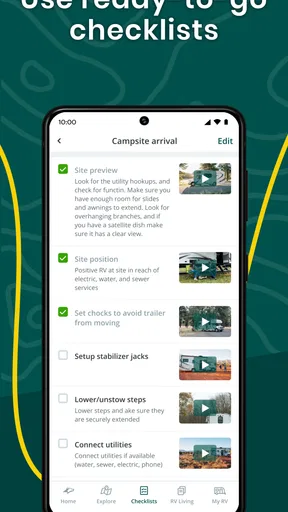
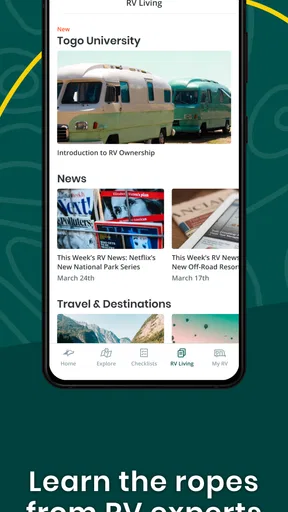
The strongest part of the concept is the separation between several kinds of travel help. An RV GPS answers “where should I go?” while a checklist answers “what should I remember?” and a how-to section answers “what do I do next?” Those are different needs, and placing them within one app can reduce the need to switch between a general map, saved notes, browser searches, and printed reminders.
In my experience, that matters most before departure. I can imagine using the navigation area to think about the route, then moving to a checklist before pulling away from a campsite. That workflow is easier to follow than keeping a paper list in one place, a map in another, and maintenance advice somewhere else. It also helps users who prefer information grouped by task instead of presented as one large stream of travel content.
Readability is not only about font size. It is also about whether the screen asks me to process too much at once. RV travel already involves vehicle dimensions, fuel planning, campsite details, weather, passengers, and timing. A useful interface should let me identify the next action without forcing me to interpret a crowded screen while moving. I would therefore use Togo RV before driving and during planned stops, not as something to explore while the vehicle is in motion.
The app’s broad scope can be both a benefit and a source of friction. A first-time RV user may appreciate having guidance nearby, but a frequent traveler may want to reach the map immediately. If the surrounding content feels more prominent than the route, the all-in-one design can become slower than opening a dedicated navigation app. My practical tip is to prepare the route and review the relevant checklist before starting the engine, then treat the phone as a reference tool rather than a dashboard companion.
For people who find dense visual interfaces tiring, the checklist idea is particularly valuable when used deliberately. Breaking preparation into smaller actions can make a complicated departure feel manageable. I would use it to create a repeatable sequence: inspect the outside, secure interior items, confirm connections, and then begin the journey. I am not claiming that every screen is optimized for every visual need, but the task-based structure gives users a better foundation than a generic map alone.
Why the RV-specific focus matters
General navigation apps are designed for ordinary driving. They are excellent for finding roads, businesses, and arrival times, but they do not naturally frame a journey around RV ownership. Togo RV is more useful when the question is not simply “how do I get there?” but “how do I prepare this vehicle and trip responsibly?” That difference gives it a clear purpose within the travel category.
The distinction is important for beginners. Someone borrowing an RV may not know which preparation steps are easy to overlook, while an experienced owner may want a consistent routine after a long break. The app’s how-to material and checklists can serve both groups, although experienced users may find some guidance too basic. I would see it as a companion for organization and confidence, not as a replacement for the vehicle manual or professional advice when a mechanical issue is serious.
Motor, sensory, and cognitive considerations in everyday use
Operating an app with one hand, while standing beside a vehicle or wearing gloves, is a different challenge from using it at a desk. RV travel often happens outdoors, where sunlight, wind, noise, cold, and limited attention can affect how easily a person taps and reads. Togo RV makes the most sense when I have time to stop, stabilize the phone, and work through a task rather than trying to complete several actions quickly.
That limitation is not unique to this app, but it changes how I would recommend using it. A person with reduced dexterity may benefit from preparing checklists in advance and keeping the number of interactions low during departure. A traveler with limited vision may prefer to review information before leaving, enlarge the device’s system text if supported by the phone, and use a separate navigation setup that is easier to hear or read while driving. The app should be part of a planned routine, not the only support available.
For users with hearing differences, written how-to content and checklists are more useful than relying on spoken instructions. For users who process information slowly or become overwhelmed by long instructions, the ability to approach preparation as individual tasks may be reassuring. I would still read the material in a calm setting first, because a checklist is most helpful when I already understand what each item means. A short label cannot replace learning a safety-critical procedure.
There is also a cognitive advantage to keeping travel preparation in one familiar place. When I return to the same app before each trip, I do not have to remember which notes or websites I used last time. That can reduce mental load for people who struggle with working memory, especially after a tiring day of driving. The trade-off is that an all-in-one app can also become a single point of confusion if navigation, advice, and other content are not clearly separated.
My most useful workflow would be to create a personal order of operations outside the driving phase. I would open the app at home or at the campsite, read the relevant how-to guidance, and then use the checklist as a final prompt. This approach supports users who need extra time, avoids rushed tapping, and makes it easier to ask a travel companion for help with a specific step rather than handing over the entire process.
A realistic travel scenario
Imagine leaving a campsite early with two passengers, a vehicle that has been parked overnight, and a long route ahead. Instead of starting with navigation, I would first use the checklist to work through the departure routine. If I were unsure about one step, I would consult the related how-to material while stationary. Only after the vehicle was ready would I move to the RV GPS portion for the journey.
That order is more inclusive than treating the app as a map that happens to contain extra articles. It gives a traveler with anxiety, limited experience, or difficulty remembering sequences a predictable starting point. It also helps a companion participate: one person can read the next checklist item while the driver remains focused on the vehicle and surroundings. The app does not remove the need for judgment, but it can make preparation less dependent on memory alone.
Access in different places and travel conditions
Situational access is where RV software faces its hardest test. A screen that is comfortable indoors may be difficult in bright sunlight. A route that is easy to follow on a quiet afternoon may require more concentration at night, in rain, or in unfamiliar traffic. Togo RV’s usefulness therefore depends not only on its interface but also on when and where I choose to use it.
I would treat the app as a planning companion before departure and during safe stops. That is especially important because reading instructional material while driving is unsafe, regardless of how clear the screen may be. A passenger can help with route review, but I would still avoid making the passenger responsible for interpreting complicated information at the last second. The best experience comes from preparing decisions earlier and using the journey itself for confirmation rather than discovery.
For travelers who move between areas with unreliable connectivity, preparation becomes even more important. I would not assume that an app with an RV GPS automatically provides every route detail in every condition. Before leaving, I would check the planned journey, keep an alternative map or written destination details available, and confirm important campsite information through the appropriate source. This is a sensible precaution for any navigation tool, and it prevents the all-in-one promise from becoming overconfidence.
The app can also help in shared travel settings. A couple may divide responsibilities, with one person handling the checklist and another reviewing the route. A family member who does not drive can use the how-to material to understand the routine and support the driver without needing to know every technical detail. For solo travelers, the same structure can act as a second memory, but I would still avoid depending on a phone for every safety decision.
People with sensory sensitivities may prefer using the app away from the campsite’s noise and activity. I would review guidance inside the RV or at home, where lighting and sound are easier to control. Someone who becomes uncomfortable with extended screen use could print or copy the essential sequence into a simpler personal note after learning it. That may seem less convenient, but inclusive use often comes from combining the app with familiar tools instead of forcing one product to handle every situation.
Where the experience still creates barriers
The largest barrier is the tension between breadth and simplicity. Togo RV covers navigation, education, and preparation, but those areas serve different moments. A user who opens the app for one urgent answer may have to work through more context than expected. A beginner may welcome that context, while an experienced RVer may see it as extra steps. The right experience depends heavily on whether I am learning, preparing, or already on the road.
The rating is another reason I would recommend testing the app personally rather than assuming it will suit every phone and travel style. With over 100K installs, it has reached a meaningful number of users, but popularity does not guarantee a smooth experience for a particular person. The current version is 1.4.55, and the app supports devices running Android 6.0 or later. Those details make it accessible to many older Android phones, although older hardware can still affect responsiveness and readability.
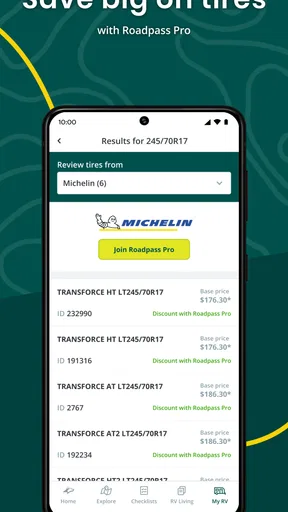
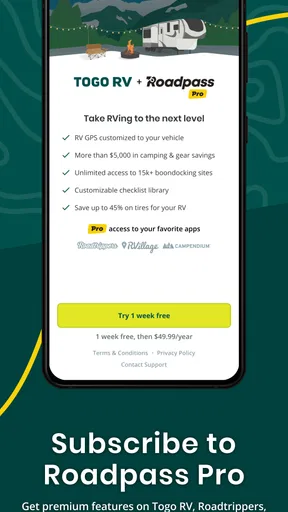
There is also a financial detail worth understanding. The app is free to install, but it includes in-app purchases ranging from $0.99 to $59.99 per item. That does not automatically make it poor value, yet I would check which parts of the experience I actually need before paying for anything. Someone who only wants occasional reminders may be satisfied with the basic offering, while a committed RVer may consider additional tools worthwhile if they fit a regular travel routine.
Because the content is aimed at Everyone, I would expect it to be suitable for a broad audience, but an age rating does not answer every accessibility question. It does not tell me whether every instruction is equally easy for a person with low vision, limited dexterity, dyslexia, hearing loss, or attention difficulties. My advice is to judge the app alongside the phone’s own accessibility settings and the user’s preferred support tools.
Another barrier is responsibility. A checklist can remind me to perform a task, but it cannot inspect the vehicle or decide whether a problem is safe to ignore. How-to content can explain a process, but it should not encourage a user to attempt work beyond their knowledge. I would use the app to organize questions and routine checks, then rely on the owner’s manual or a qualified professional for issues involving brakes, tires, electrical systems, gas, or other safety-critical equipment.
Finally, dedicated alternatives may be better in specific situations. A specialist navigation product may offer a more focused driving experience, while a simple notes app may be faster for a personal checklist. A printed guide can be easier to read in bright sunlight or when battery life is a concern. Togo RV earns its place when I value the combination of RV guidance and trip organization; it is less compelling when I already have separate tools that suit my needs perfectly.
My inclusive verdict for RV travelers
I see Togo RV as a useful companion for people who want structure around RV travel, especially beginners, occasional renters, and owners who appreciate having preparation guidance near their route planning. Its best quality is not a single feature but the way it connects several stages of a trip: learning what to do, remembering what to do, and thinking about where to go. That makes it more relevant to RV life than a standard map.
Its accessibility potential comes from good habits rather than promises. I can make it easier to use by preparing in advance, enlarging system text where possible, choosing a quiet and well-lit setting, involving a passenger, and keeping a backup plan for navigation. Those steps are especially valuable for users with visual, motor, sensory, or cognitive needs. They also improve the experience for anyone who is tired, distracted, or new to RV travel.
I would skip it if I want nothing beyond fast, highly focused navigation, if I dislike apps that combine several types of content, or if I need guaranteed offline independence without preparing a backup. I would also avoid treating it as a technical authority for vehicle problems. In those cases, a dedicated navigation app, the vehicle manual, a paper checklist, or professional assistance may be the better choice.
For me, the decision comes down to workflow. If I want one free starting point for RV GPS guidance, how-to reading, and checklists, this app is worth trying. I would install it with modest expectations, explore it while stationary, and decide quickly whether its organization matches the way I travel. The developer is Roadpass Digital, and the app was released on September 19, 2018, so its established presence is reassuring, but the uneven rating means personal testing matters.
Overall, I recommend Togo RV most strongly as a preparation and confidence tool, not as an unquestioned all-purpose replacement for every travel app. Its most inclusive strength is giving different travelers a repeatable way to prepare, while its main weakness is that the broad all-in-one design may demand more attention than some users can comfortably give. If you use it before the journey, adapt it to your own abilities, and keep appropriate alternatives nearby, it can make RV travel feel more organized without pretending to remove every barrier.
Verdict
Strengths of Togo RV – RV GPS and more
- Designed specifically for RVs, campers, and larger vehicles
- Helps avoid unsuitable roads, bridges, and low-clearance routes
- Offline maps can be useful in areas with weak mobile coverage
- Includes RV-relevant points such as campsites and service locations
- Route planning can account for vehicle dimensions and travel restrictions
Limitations of Togo RV – RV GPS and more
- Some advanced navigation features may require a paid subscription
- Map data and campsite listings may vary by country or region
- Large app downloads can consume considerable storage space
- GPS navigation may drain the phone battery during long trips
- Route recommendations should still be checked against current road signs
Other Releases by Roadpass Digital
View All
Campendium - RV & Tent Camping
Travel & Local1.7
Similar Picks in This Category
View All
Google Maps
Google LLC3.4

Google Maps Go
Google LLC4.1

Booking.com: Hotels & Travel
Booking.com Hotels & Vacation Rentals4.8

Google Earth
Google LLC3.8

Skyscanner Flights Hotels Cars
Skyscanner Ltd4.8

trivago: Compare hotel prices
trivago N.V.4.4
Frequently Asked Questions
What is Togo RV – RV GPS and what does it offer?
Togo RV is an RV-focused travel app designed to help motorhome and camper travelers plan routes, discover campgrounds, find service locations, and organize trips. It combines navigation tools with RV-specific information, such as campground details, road-trip planning resources, maintenance guidance, and travel content. The app is intended to make planning easier for both occasional campers and experienced RV owners.
Does Togo RV provide GPS navigation suitable for every RV?
Togo RV includes navigation features intended for RV travel, but users should check the available vehicle-profile settings and route limitations before relying on it for a specific motorhome, trailer, or fifth-wheel. RV routes can be affected by height, weight, length, and road restrictions, and no navigation app should replace posted signs or local regulations. It is wise to compare the suggested route with official road information.
Is Togo RV free to download, or does it require a subscription?
The app can generally be downloaded without paying an upfront installation fee, but some of its more advanced tools, content, or membership benefits may require a subscription or in-app purchase. The exact features available at no cost can change over time, so prospective users should review the current pricing page and trial conditions in the Google Play Store or Apple App Store before starting a plan.
Can I use Togo RV to find campgrounds, RV parks, and travel services?
Yes, campground and RV-related discovery is one of the app’s main purposes. Depending on the location and the information available, users may browse RV parks, campgrounds, service centers, fuel stops, and other useful destinations. Listings can include reviews, amenities, photos, and practical details, but coverage and accuracy may vary. Always confirm availability, operating hours, reservation rules, and current site conditions directly with the provider.
Does Togo RV work without an internet connection?
Some planning information may remain accessible after it has loaded, but users should not assume that every Togo RV feature works fully offline. Live navigation data, traffic updates, search results, account services, and listing changes may require mobile data or Wi-Fi. Before traveling through remote areas, download or save important trip details where possible, carry offline maps or printed information, and keep a backup navigation method available.
